An AI automation for Gmail clears repetitive messages before the team has to touch them.
A shared Gmail inbox, several thousand emails a month. Employees answer the same simple questions over and over, resend missing links, confirm deadlines, and forward threads to each other rather than doing the work you pay them for. We built an AI automation: it connects to the Gmail inbox, reads new mail, recognizes intent and urgency, and closes the routine by approved policy. Any higher-risk case it stops for a human.
Problem, solution, and result
The same three questions, and the one case you can't miss
Every day the same simple questions landed in the shared inbox: where's the invoice, is the deadline still on, can you resend the link. The team retyped the same answers daily, and a large share of that mail should never reach a specialist. The trouble was never the count itself; it was the few sensitive cases hiding inside the routine, the ones you can't afford to miss.
Classification without tools, the decision in policy
The system reads every new email, closes out the routine ones itself, and hands a person only the cases that require a decision. It works out what each message is about and how urgent it is, and answers the repetitive ones using rules approved up front. Any higher-risk case goes to a human with the reason and the relevant context already pulled out. Every email enters a durable queue with a deduplication key, the model returns a structured result (intent, confidence, risk signals), and policy in code decides what happens next.
For whom
Do this at your company if a shared inbox eats your team's time and the same simple questions keep blocking people who should be doing higher-value work.
Message → policy → reply
- 01Routine cases close without another click from the team
- 02Exceptions stop for human review
- 03The reason stays attached to the thread
- Business type
- Companies running a shared customer or operations inbox
- Channel
- Shared Gmail inbox
- Volume
- ~3,000 emails / month
- Human decision
- Sensitive or uncertain cases wait for a person
- Similar system build
- from €3,500 net
- Security
- Messages that try to override the rules are isolated before they reach the inbox
- Trace
- Reason, policy version, content hash, cost
Human handoff
Routine inbox work stays routine
No customer receives a speculative reply. Routine answers can proceed only when policy allows them; money, contracts, complaints, negotiation, unusual requests, and uncertain classifications wait for review. The reviewer sees why the case stopped and can decide without reconstructing the whole thread.
- Security
- Messages that try to override the rules are isolated before they reach the inbox
What we changed after early misses
Early versions treated some short, ambiguous emails as routine. We raised the confidence threshold, so unclear cases now wait for a person, validate drafts before sending, and isolate messages that try to override the workflow. The evidence covers these operating rules; unusual inbox edge cases still need human review.
Work surfaces
Routine emails move faster. Sensitive cases stay with your team.
At ~3,000 emails a month the automation closes repetitive cases inside policy, and only a narrow stream reaches the human inbox: money, contracts, complaints, and low-confidence classifications, each with the reason and context already prepared. Repetitive questions end at an approved rule, and a specialist only sees cases that need their decision.
How the system routes mail: a draft, a send, or an escalation.
Inbox
The system watches a selected Gmail inbox and works only inside the approved message scope, with no access to the rest of the account.
Policy
A routine reply is allowed only where an approved rule, a matched FAQ, and enough context exist. You set the thresholds and allowed intents for your own process.
Review
A human receives the stop reason, urgency, and extracted context, ready to decide.
Deployment screenshots
Decision view from the running inbox automation.
Screenshots from the running inbox automation, with client data redacted for publication.
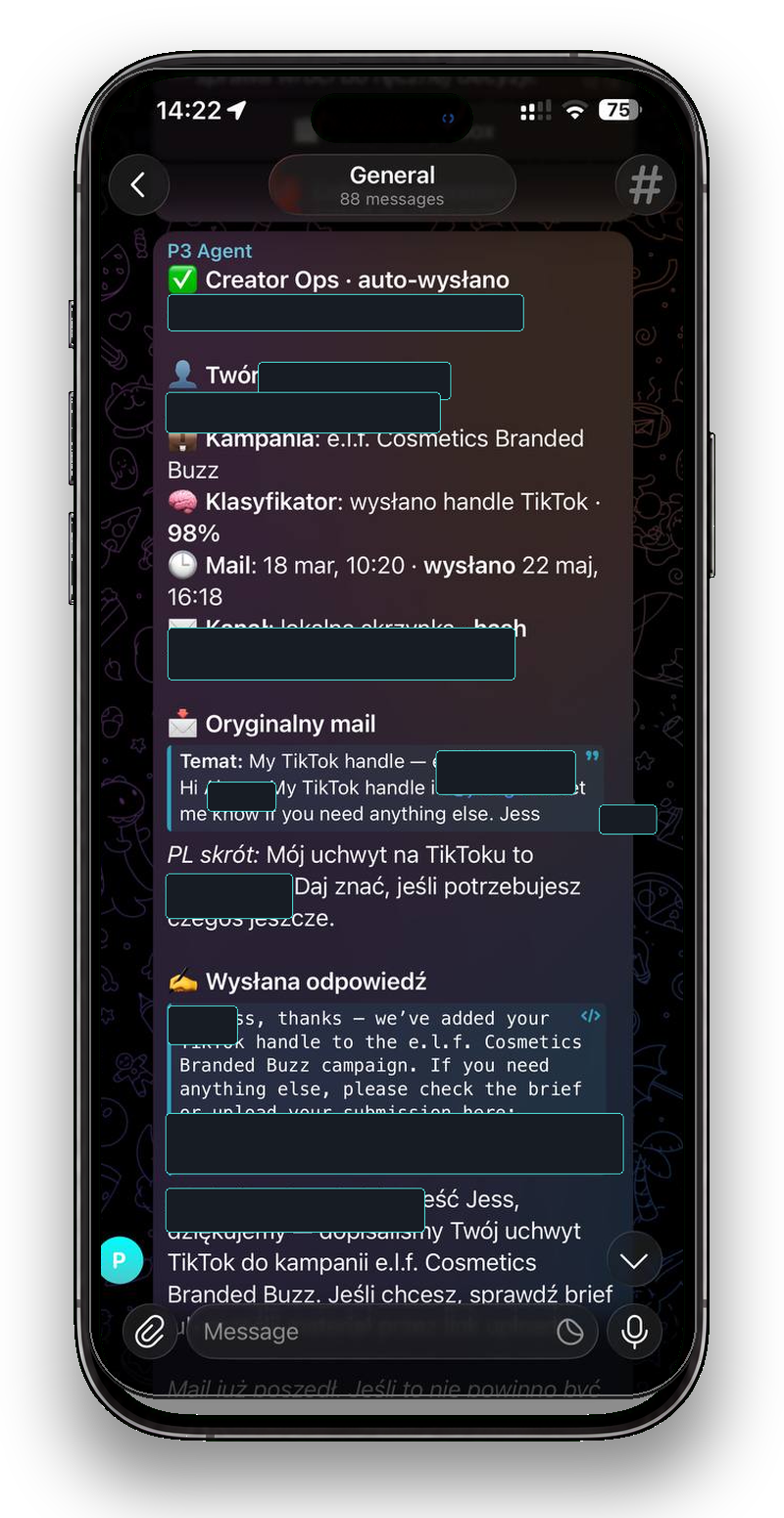
Telegram on mobile
The decision fits on one operator screen.
A Telegram frame in a phone mockup, with client data anonymized. The operator approves, edits, or takes over a case without leaving the chat.
01A routine email closed automatically once it matched an approved policy rule.
- Screen 01email-triage
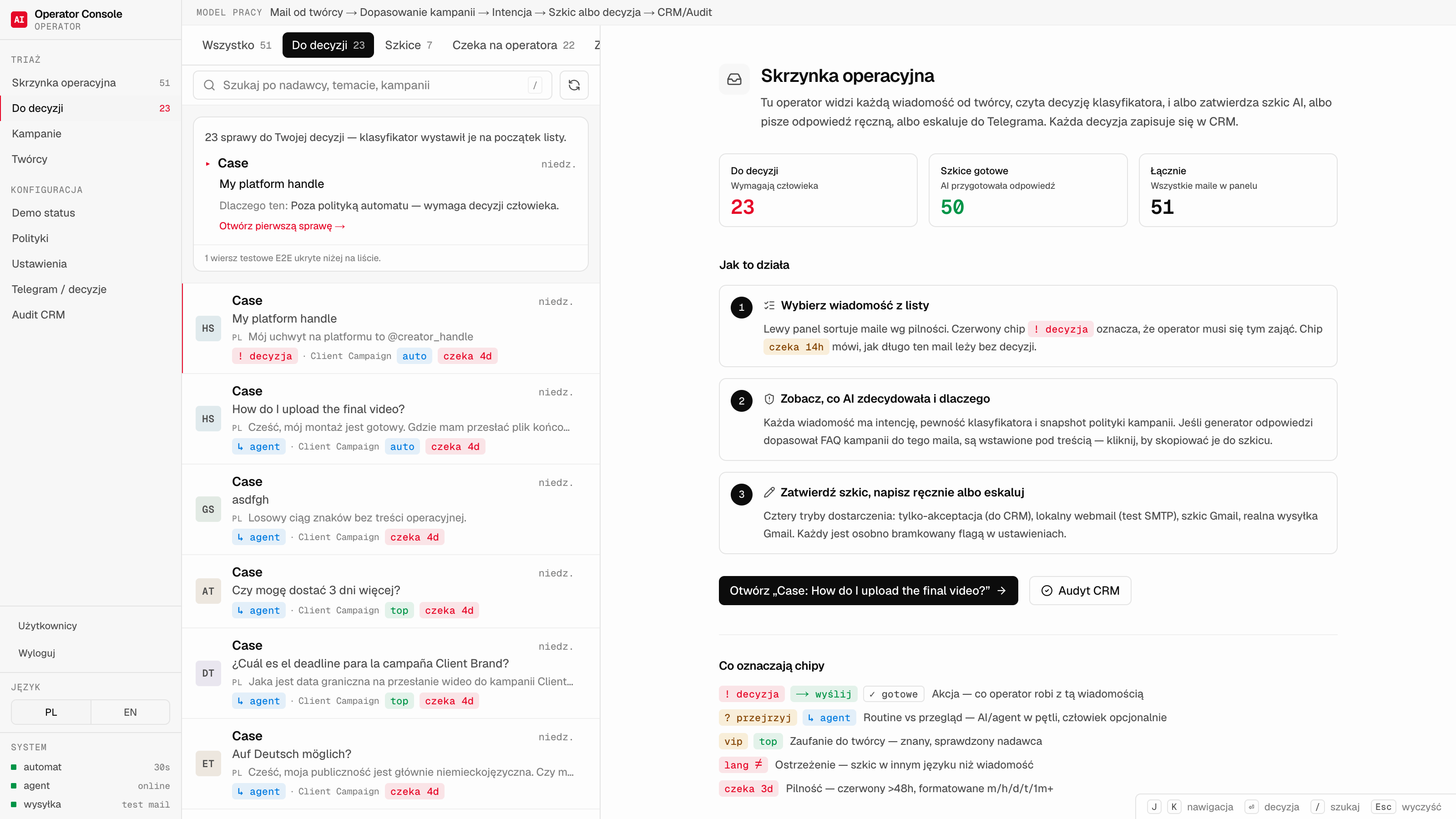
01The queue of cases stopped for review, each with its escalation reason. - Screen 02email-triage
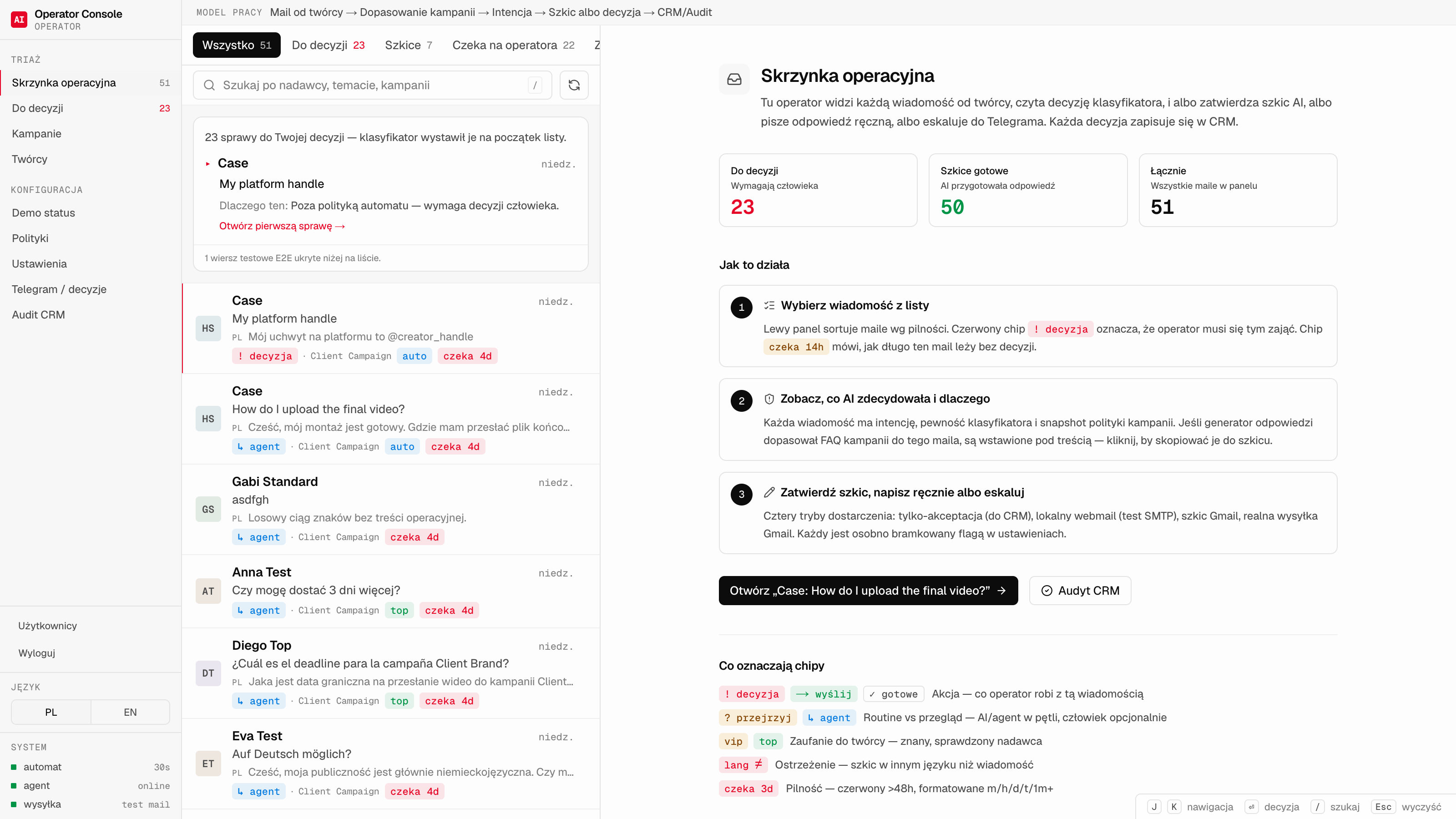
02A reply draft next to the policy and FAQ that allowed it. - Screen 03email-triage
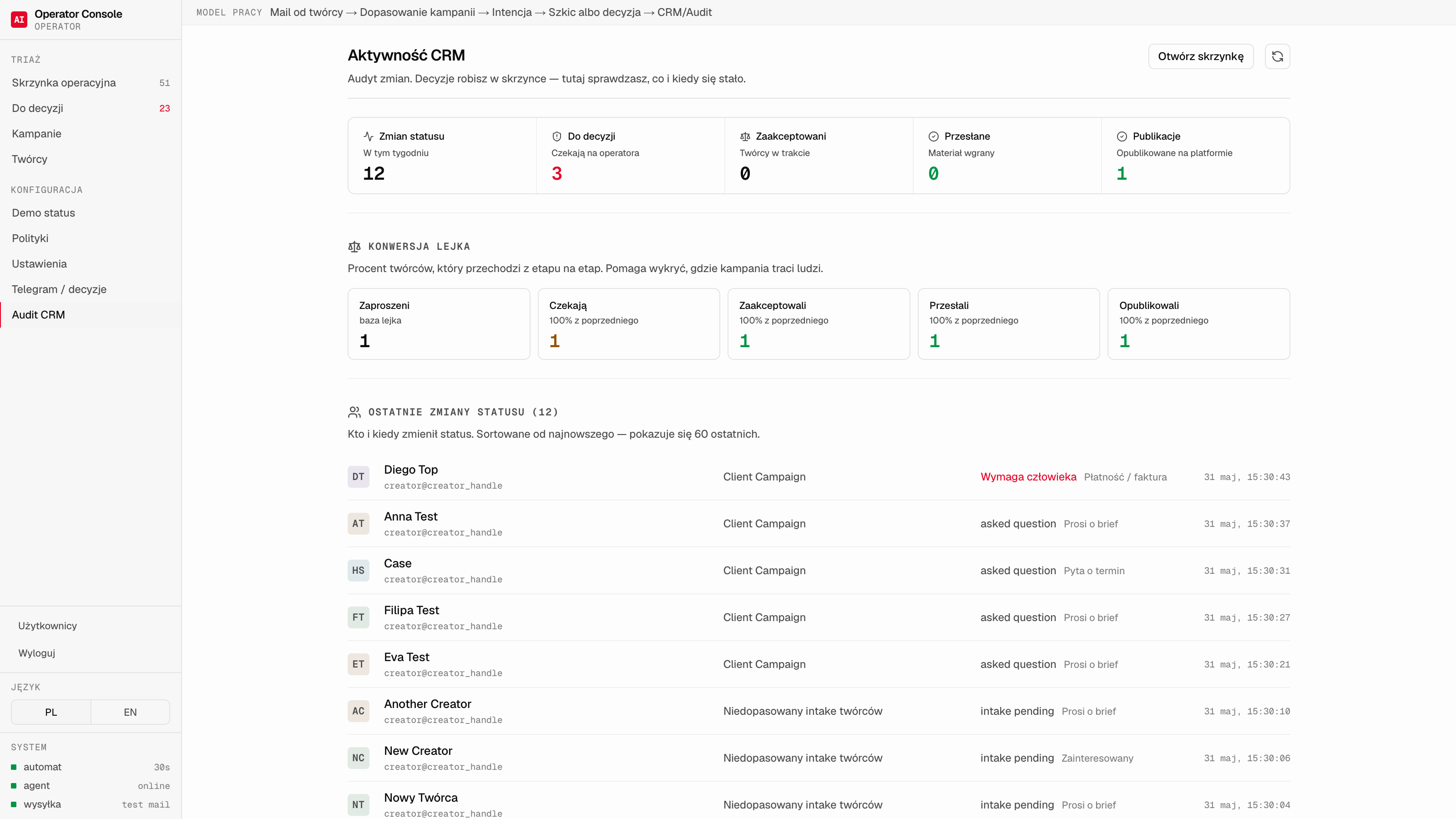
03The decision trace on a message: intent, confidence, next step.
Technical details and measurements
Operating loop
The inbox does not decide alone. Every case passes through policy first.
The system reads the thread, classifies intent with a model that has no tools, and checks the approved response rules. Only then does policy route the case to a draft, a send, or a human escalation.
Gmail inbox (~3,000/mo)
Read intent, urgency, and thread context
Routine → approved draft or reply
Exception → human review with reason and context
Decision and reply trace kept for review
System architecture
Inbox, classification, policy, and trace.
The system reads every new thread, classifies it with a model that has no tools, checks the process policy, and only then acts or escalates. Every step is recorded in the log.
- 01
Intake
The Gmail inbox, in a queue that drops nothing.
The system connects to a selected Gmail inbox and works only inside the approved message scope. Every email enters a durable queue with a deduplication key and retries, so no message is skipped or handled twice.
- 02
Classification
The model recognizes intent, but takes no action.
Message content is data to process; an instruction written into an email starts nothing. The model receives bounded thread context and returns a structured result: intent, confidence, risk signals, and whether the case is routine-answerable. It has no access to any tools, and low confidence or an unusual signal routes the case to a human automatically.
- 03
Policy
Process rules decide what may close without a human.
A routine reply is allowed only where an approved rule, a matched FAQ, and enough context exist. Confidence thresholds, allowed intents, and stop rules are set per process. Anything outside them, such as money, contracts, complaints, and negotiation, stops for review.
- 04
Consent and trace
A validated draft, a decision on one screen, proof in the log.
A routine draft passes deterministic validation before it can be sent. An exception arrives as a decision card in Telegram: the stop reason, the next step, a ready draft, and a thread excerpt, with approval buttons. Every action leaves an auditable trace you can replay: the decision reason, the policy version, the hash of the reply text, and the model and cost of the query.
Why the model classifies and policy decides
The system runs every message through a fixed pipeline: it reads context, classifies it with a model that holds no tools, checks policy, prepares a reply, and acts only inside approved rules. The model supplies the classification, policy selects the action, and sensitive or unclear cases wait for a human.
- Policy decides the next step: draft, send, or escalation
- Combines the inbox, the process policy, and the decision channel in one loop
- Acts only in allowed categories and stops sensitive cases
- Every decision leaves a trace: reason, policy, content hash, and cost
Want to assess a similar process in your company?
- A 30-minute call with the engineer who would lead the work.
- A review of the processes that cost you the most time and money.
- A written summary of what to automate first and the likely cost range.
Times are shown in your own time zone. We work with clients across time zones.
The scan chooses one process to assess, and within 2 business days you receive a recommendation, including when a simpler route is the better fit.